
User Referral Program
Please note that this document will be updated periodically.
Step 1: Manage User Profile Referral (Ambassador) Program
How to access the Referral (Ambassador) Program
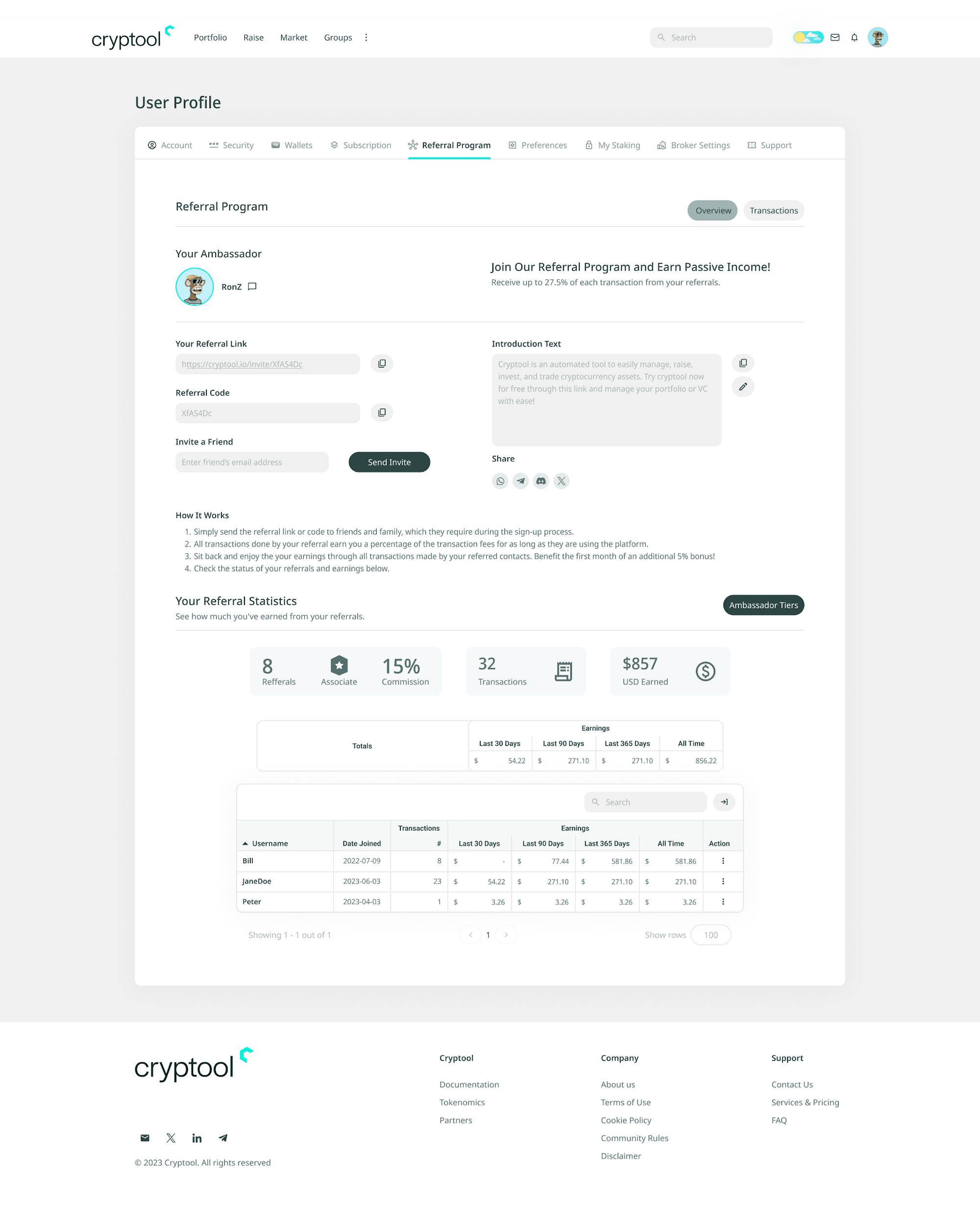
Click on the person icon on the top right, select View Profile from the dropdown, and click on the Referral Program tab. By default the Referral Program Overview is shown (indicated by the buttons on the top right of the tab).
How to refer another user to Cryptool.io
Option 1, Share your referral link or code
- Click the Copy icon next to Your Referral Link or Referral Code.
- Share it with friends and family for them to use during sign-up.
Important: the Referral Link automatically fills in your referral code during registration. The Referral Code must be entered manually if signing up without the link.
Option 2, Invite via email
- Enter the person's email in the Invite a Friend field.
- Click Send Invite to send them an invitation directly.
Option 3, Share via social media
Click on any of the social media icons to forward an invitation message to your contact(s). Click the Edit button to update your introduction message before sending invites.
Important: ensure your wallets for all blockchains are added to receive referral rewards per chain. See the User Wallets guide to set up your wallets.
Step 2: Referral Statistics and Commissions
How to see your referral statistics
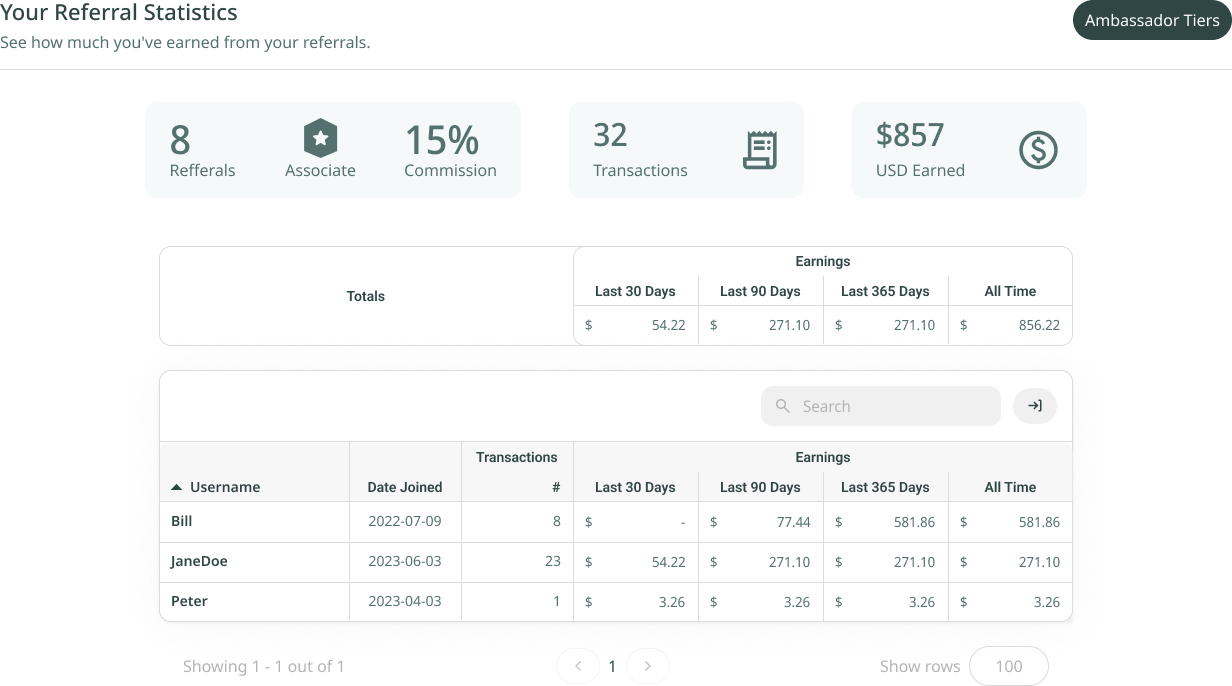
Scroll down to the second part of the Referral Program tab to see your referral statistics and earnings.
Status view
- # of Referrals: total users referred.
- Current Commission Percentage: starts at 10% and can be increased through bonuses (see below).
- # of Transactions: completed by referrals.
- USD Earned: total earnings from referrals.
Commission bonuses
- Main Ambassador Status: adds +5% to the base commission (10% → 15%). Available for KOLs, influencers, large community owners, and partners with agreements. Please contact the team if interested.
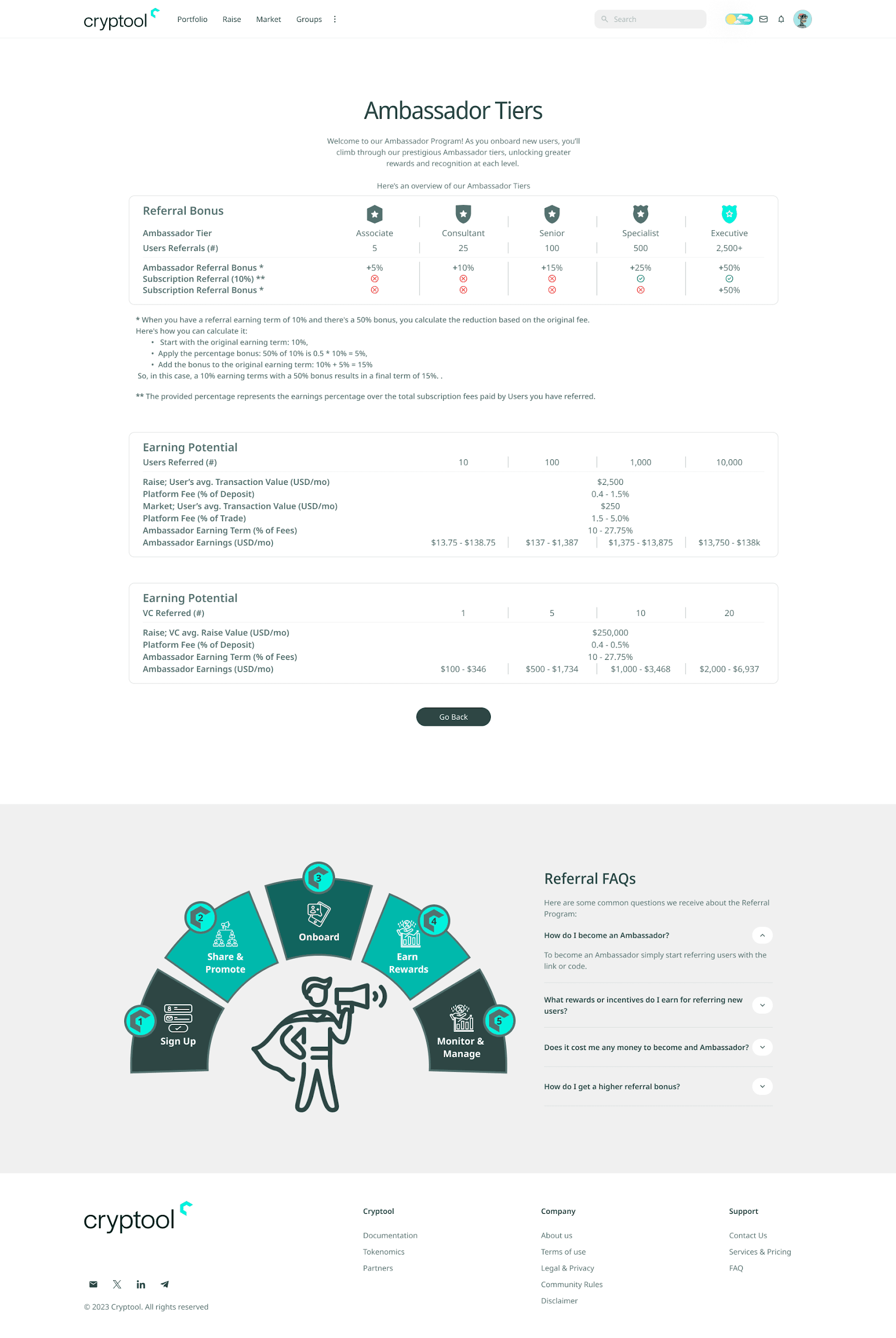
- Ambassador Tier Bonus: +5% to +50% multiplier, based on performance. See the Ambassador Tiers page for details.
- Staked Token Bonus: +2.5% to +25% multiplier, based on tokens staked.
Commission calculation example
Assume your base commission is 10% and you qualify for the following bonuses:
- Main Ambassador Bonus: +5% (applied instantly).
- Ambassador Tier Bonus: +50%.
- Staked Token Bonus: +25%.
Step 1, add the Main Ambassador Bonus: 10% + 5% = 15%.
Step 2, apply the tier and staked bonuses (multiplication): total multiplier = 100% + 50% + 25% = 175% = 1.75.
New commission = (10% + 5%) x 1.75 = 26.25%.
Summary table view
The summary table includes the following columns:
- Username (referral)
- Date referral joined
- Total transactions per referral
- Earnings per 30 days
- Earnings per 90 days
- Earnings per 365 days
- All-time earnings per user
Step 3: Ambassador Tiers
How to view Ambassador Tiers
Click on Ambassador Tiers at the top of the Referral Statistics section to explore the different tiers and their corresponding benefits. To return to the Referral Program tab, click Go Back at the bottom of the Ambassador Tiers page.
Step 4: Earning Transaction Details
How to see earning transaction details
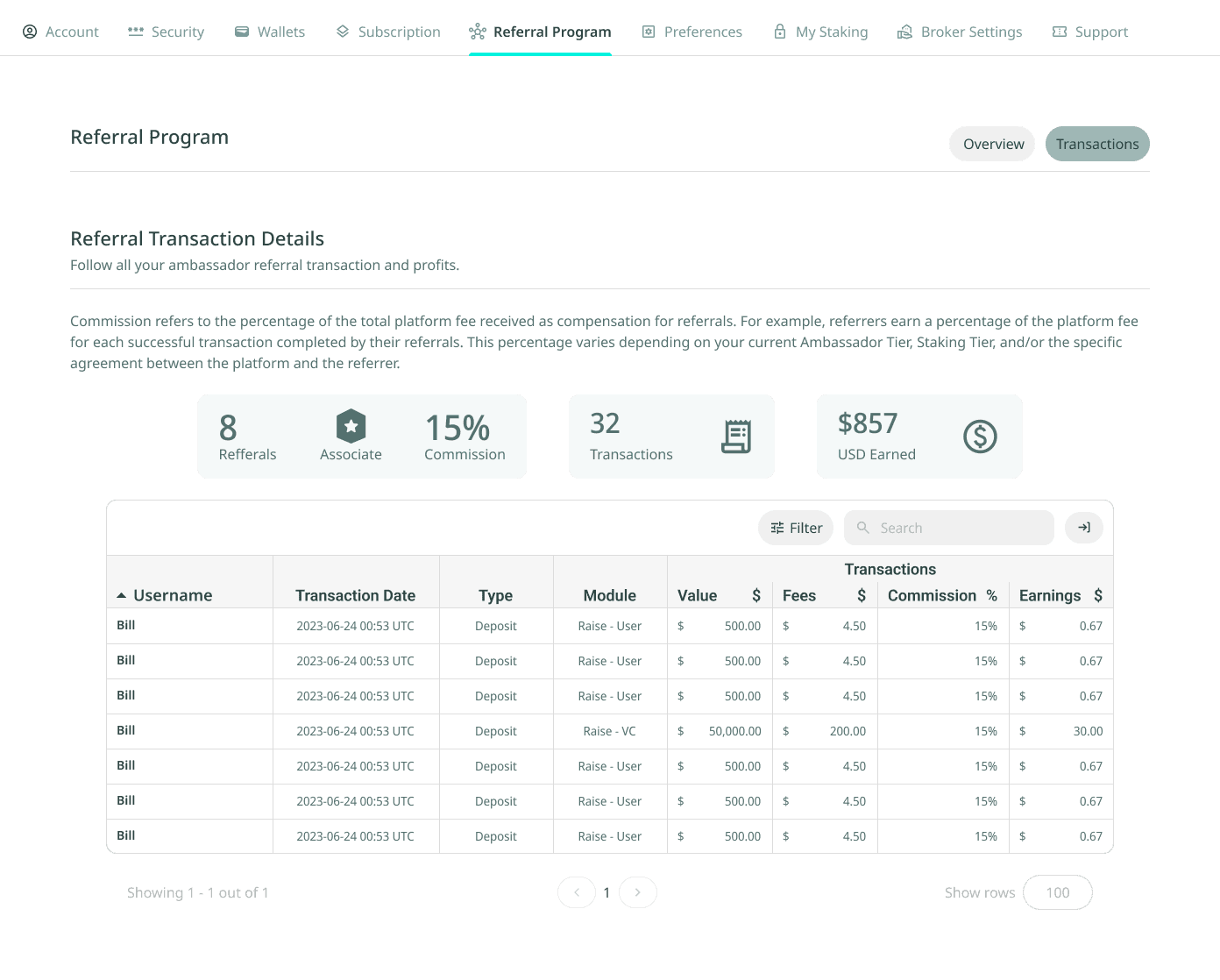
While in the Referral Program tab, click on Transactions on the top right of the tab.
Transaction detail table columns
- Username (Referral): the username of the referred user.
- Date of Transaction: the date the transaction took place.
- Transaction Type: either Deposit (when a user deposits into a funding pool) or Transaction (general transactions on the platform).
- Transaction Module: one of:
- Raise - User: when a user deposits funds into a funding pool.
- Raise - VC: when a group raises funds via a funding pool.
- Marketplace: when a seller sells allocation on the Marketplace.
- Value of Initial Transaction ($): the monetary value of the initial transaction.
- Fees Paid by Referral ($): the fees paid by the referred user during the transaction.
- Your (Ambassador) Commission (%): the commission percentage at the time of the transaction.
- Your (Ambassador) Earnings ($): the earnings you received from the transaction.
'%3e%3cpath%20d='M3.58464%2016.6693C3.1263%2016.6693%202.73394%2016.5061%202.40755%2016.1797C2.08116%2015.8533%201.91797%2015.4609%201.91797%2015.0026V5.0026C1.91797%204.54427%202.08116%204.15191%202.40755%203.82552C2.73394%203.49913%203.1263%203.33594%203.58464%203.33594H16.918C17.3763%203.33594%2017.7687%203.49913%2018.0951%203.82552C18.4214%204.15191%2018.5846%204.54427%2018.5846%205.0026V15.0026C18.5846%2015.4609%2018.4214%2015.8533%2018.0951%2016.1797C17.7687%2016.5061%2017.3763%2016.6693%2016.918%2016.6693H3.58464ZM10.2513%2010.8359L16.918%206.66927V5.0026L10.2513%209.16927L3.58464%205.0026V6.66927L10.2513%2010.8359Z'%20fill='%232F4644'/%3e%3c/g%3e%3c/svg%3e)


'%3e%3cpath%20d='M17.6986%203.85159L15.058%2016.3047C14.8587%2017.1836%2014.3392%2017.4024%2013.6009%2016.9883L9.57749%2014.0235L7.63608%2015.8906C7.42124%2016.1055%207.24155%2016.2852%206.82749%2016.2852L7.11655%2012.1875L14.5736%205.44924C14.8978%205.16018%2014.5033%205.00002%2014.0697%205.28909L4.85093%2011.0938L0.882175%209.85159C0.0188933%209.58205%200.00326826%208.9883%201.06186%208.57424L16.5853%202.59377C17.3041%202.32424%2017.933%202.75393%2017.6986%203.85159Z'%20fill='%232F4644'/%3e%3c/g%3e%3cdefs%3e%3cclipPath%20id='clip0_17601_246206'%3e%3crect%20width='17.5'%20height='20'%20fill='white'%20transform='translate(0.25)'/%3e%3c/clipPath%3e%3c/defs%3e%3c/svg%3e)