
Crypto.com
Please note that this document will be updated periodically.
Connecting your Crypto.com Exchange account lets Cryptool automatically sync your trades. You generate a read-only API key on Crypto.com and add it to Cryptool under Integrations. Only read-only permissions are required, never grant trading or withdrawal permissions to a third-party application.
Step 1: Open API Management on Crypto.com
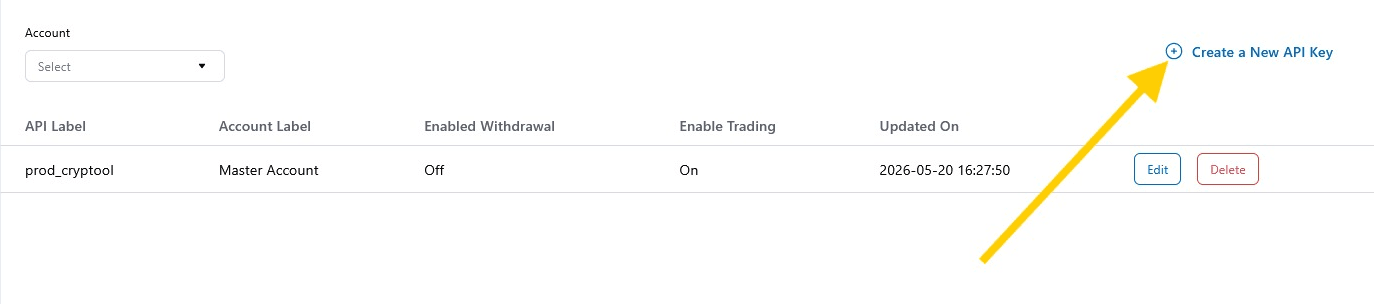
Sign in to the Crypto.com Exchange and go to Account Management → API Management (crypto.com/exchange/user/account-management/account-api-management). Click Create a New API Key in the top right.
Step 2: Name the key and confirm with 2FA
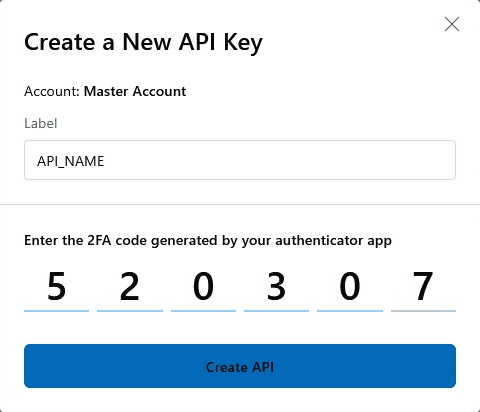
Enter a Label for the key (for example, cryptool), then enter the 2FA code generated by your authenticator app. Click Create API.
Step 3: Save your Secret Key
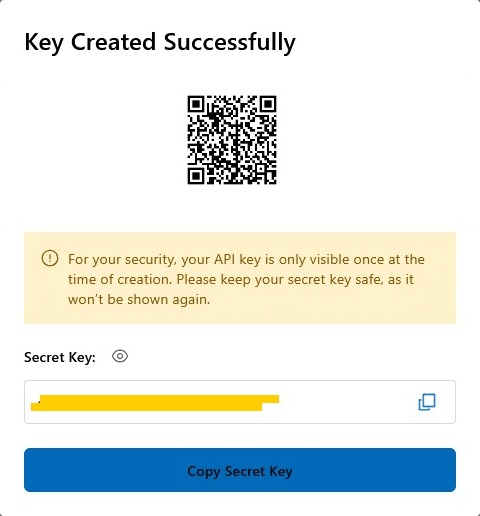
Your API key is created. Copy and save the Secret Key now: for your security, it is only shown once at the time of creation and cannot be retrieved later. Keep it somewhere safe; you will need it in Step 6.
Step 4: Edit the key permissions
Back on the API Management list, find your new key and click Edit.

Step 5: Restrict the key to read-only
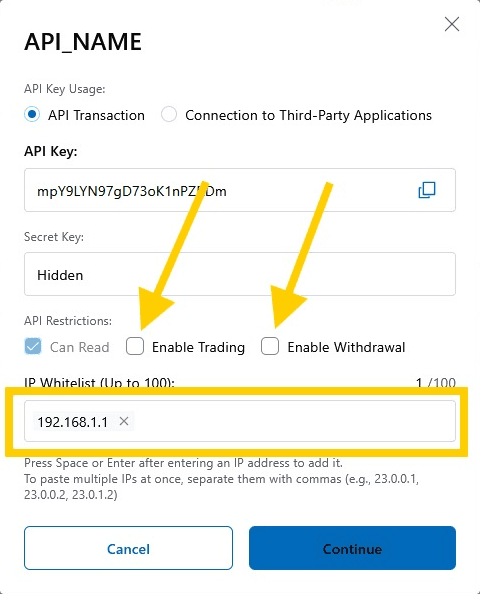
Under API Restrictions, make sure only Can Read is enabled. Leave Enable Trading and Enable Withdrawal unchecked. Optionally add your IP address to the IP Whitelist for extra security, then click Continue to save.
Step 6: Connect the key in Cryptool
In Cryptool, go to User Profile → Integrations. Under Crypto.com Integration, paste your API Key and API Secret (the Secret Key you saved in Step 3), then click Connect Account. Your trades will then sync automatically into Cryptool.
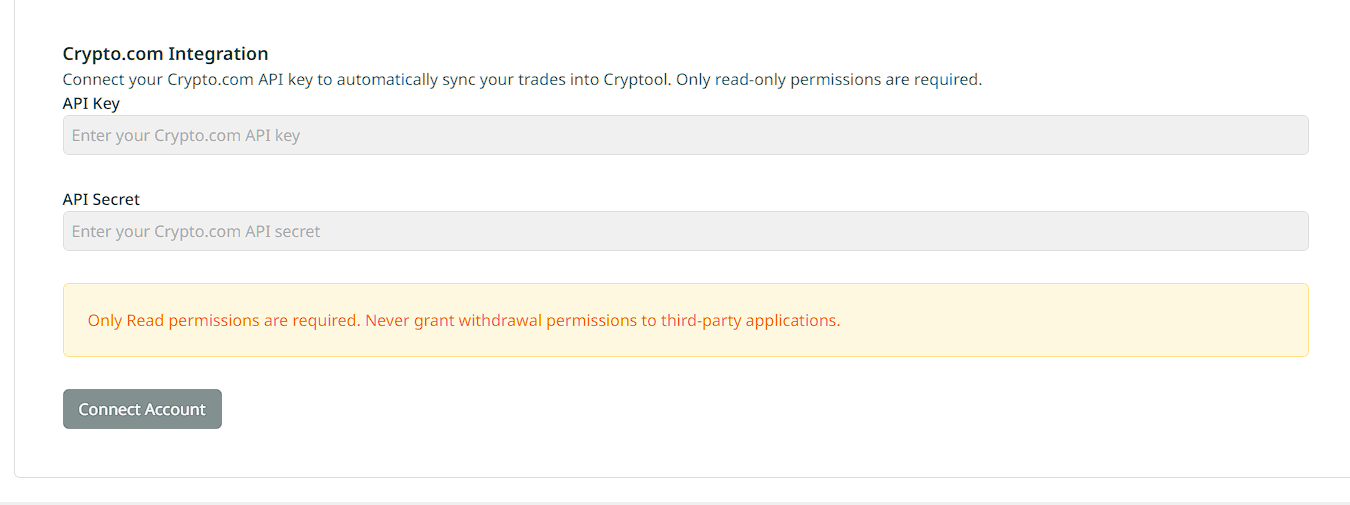
Security reminder: Only Read permissions are required. Never grant withdrawal permissions to third-party applications.
'%3e%3cpath%20d='M3.58464%2016.6693C3.1263%2016.6693%202.73394%2016.5061%202.40755%2016.1797C2.08116%2015.8533%201.91797%2015.4609%201.91797%2015.0026V5.0026C1.91797%204.54427%202.08116%204.15191%202.40755%203.82552C2.73394%203.49913%203.1263%203.33594%203.58464%203.33594H16.918C17.3763%203.33594%2017.7687%203.49913%2018.0951%203.82552C18.4214%204.15191%2018.5846%204.54427%2018.5846%205.0026V15.0026C18.5846%2015.4609%2018.4214%2015.8533%2018.0951%2016.1797C17.7687%2016.5061%2017.3763%2016.6693%2016.918%2016.6693H3.58464ZM10.2513%2010.8359L16.918%206.66927V5.0026L10.2513%209.16927L3.58464%205.0026V6.66927L10.2513%2010.8359Z'%20fill='%232F4644'/%3e%3c/g%3e%3c/svg%3e)


'%3e%3cpath%20d='M17.6986%203.85159L15.058%2016.3047C14.8587%2017.1836%2014.3392%2017.4024%2013.6009%2016.9883L9.57749%2014.0235L7.63608%2015.8906C7.42124%2016.1055%207.24155%2016.2852%206.82749%2016.2852L7.11655%2012.1875L14.5736%205.44924C14.8978%205.16018%2014.5033%205.00002%2014.0697%205.28909L4.85093%2011.0938L0.882175%209.85159C0.0188933%209.58205%200.00326826%208.9883%201.06186%208.57424L16.5853%202.59377C17.3041%202.32424%2017.933%202.75393%2017.6986%203.85159Z'%20fill='%232F4644'/%3e%3c/g%3e%3cdefs%3e%3cclipPath%20id='clip0_17601_246206'%3e%3crect%20width='17.5'%20height='20'%20fill='white'%20transform='translate(0.25)'/%3e%3c/clipPath%3e%3c/defs%3e%3c/svg%3e)