
Group Preferences
Please note that this document will be updated periodically.
This feature is only available through admin or owner status within a group.
Edit Group Preferences
How to access Group Preferences
Click on Groups in the main menu, click on the group you want to edit preferences for, and click on the Preferences tab.
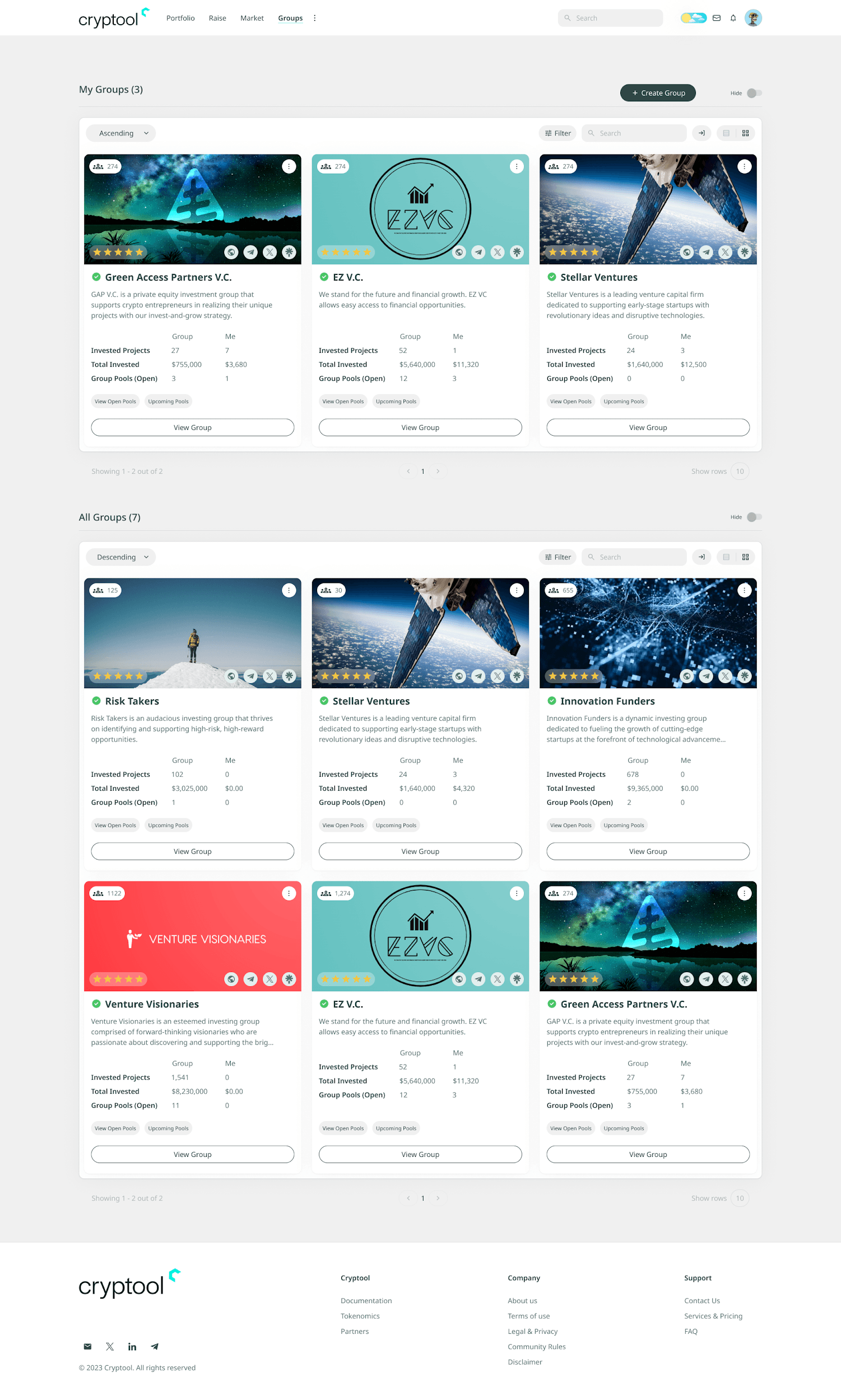
How to edit Group Preferences
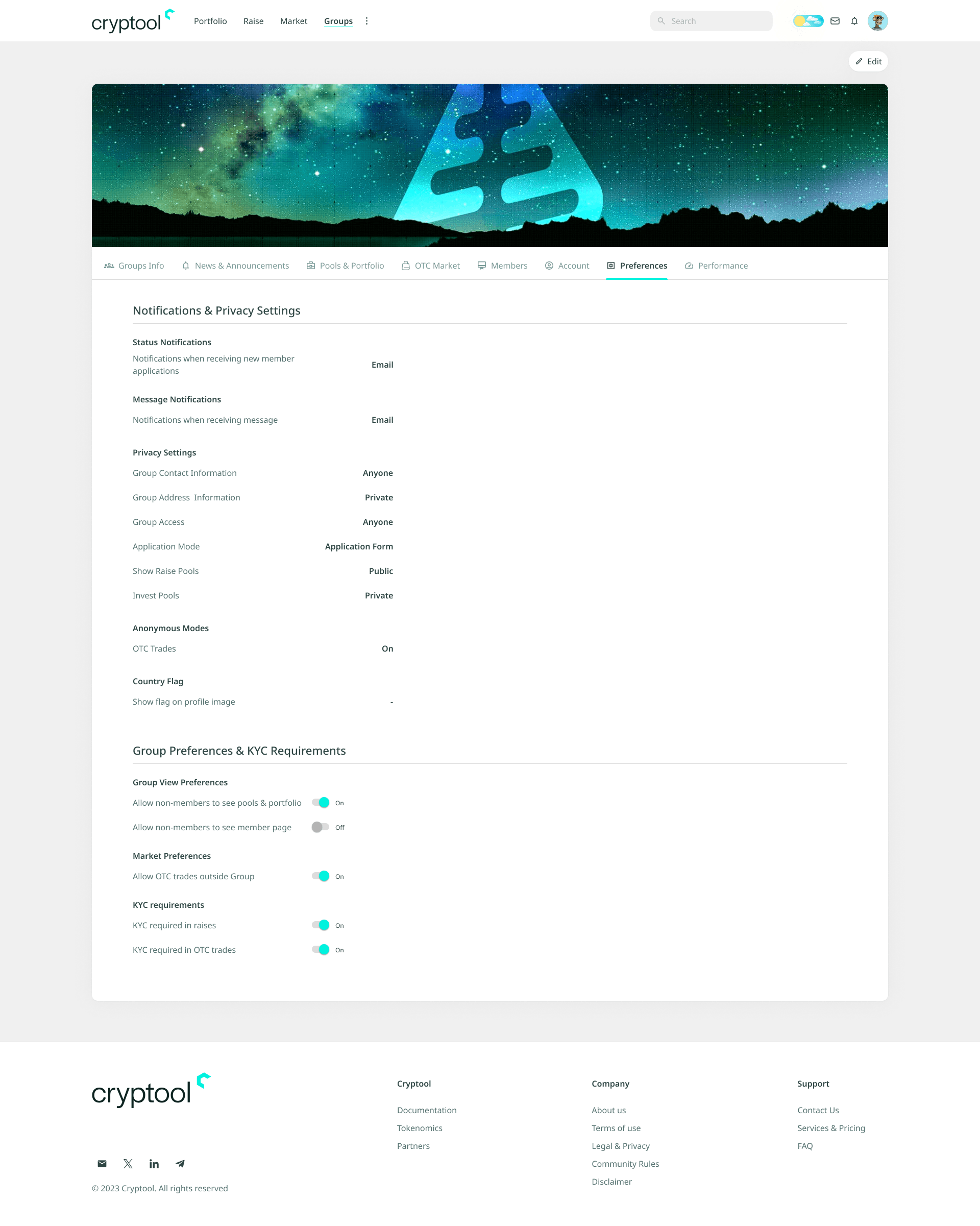
- Click Edit in the top right corner.
- Edit the text or change the values you want to update in the group preferences. The values and options are listed below.
Application Notifications
- Notifications when receiving new member applications: choose between Email, Notification, or Both.
Message Notifications
- Notifications when receiving messages: choose between Email, Notification, or Both.
Privacy Settings
- Group Contact Information: choose between Anyone, Members Only, or Private.
- Group Address Information: choose between Open, Apply Only, or Application Form.
- Application Mode: choose between Anyone, Members Only, or Private.
- Group Access: choose between Anyone, Members Only, or Private.
- Show Raise Pools: choose between Anyone or Exclusive (Public or Private). This setting is used as the default throughout the modules.
- Anonymous Modes: enable or disable anonymity.
- OTC Trades: on or off.
Country Flag
Show flag on profile image: on or off.
Group View Preferences
- Allow non-members to see pools & portfolio: on or off.
- Allow non-members to see member page: on or off.
Market Preferences
Allow OTC trades outside group: on or off.
KYC Preferences
- KYC required in raises: on or off.
- KYC required in OTC trades: on or off.
Click Save on the top right to save the edited group preferences, or click Cancel to leave without saving.
'%3e%3cpath%20d='M3.58464%2016.6693C3.1263%2016.6693%202.73394%2016.5061%202.40755%2016.1797C2.08116%2015.8533%201.91797%2015.4609%201.91797%2015.0026V5.0026C1.91797%204.54427%202.08116%204.15191%202.40755%203.82552C2.73394%203.49913%203.1263%203.33594%203.58464%203.33594H16.918C17.3763%203.33594%2017.7687%203.49913%2018.0951%203.82552C18.4214%204.15191%2018.5846%204.54427%2018.5846%205.0026V15.0026C18.5846%2015.4609%2018.4214%2015.8533%2018.0951%2016.1797C17.7687%2016.5061%2017.3763%2016.6693%2016.918%2016.6693H3.58464ZM10.2513%2010.8359L16.918%206.66927V5.0026L10.2513%209.16927L3.58464%205.0026V6.66927L10.2513%2010.8359Z'%20fill='%232F4644'/%3e%3c/g%3e%3c/svg%3e)


'%3e%3cpath%20d='M17.6986%203.85159L15.058%2016.3047C14.8587%2017.1836%2014.3392%2017.4024%2013.6009%2016.9883L9.57749%2014.0235L7.63608%2015.8906C7.42124%2016.1055%207.24155%2016.2852%206.82749%2016.2852L7.11655%2012.1875L14.5736%205.44924C14.8978%205.16018%2014.5033%205.00002%2014.0697%205.28909L4.85093%2011.0938L0.882175%209.85159C0.0188933%209.58205%200.00326826%208.9883%201.06186%208.57424L16.5853%202.59377C17.3041%202.32424%2017.933%202.75393%2017.6986%203.85159Z'%20fill='%232F4644'/%3e%3c/g%3e%3cdefs%3e%3cclipPath%20id='clip0_17601_246206'%3e%3crect%20width='17.5'%20height='20'%20fill='white'%20transform='translate(0.25)'/%3e%3c/clipPath%3e%3c/defs%3e%3c/svg%3e)